


Reset a forgotten password
If you have forgotten your password, the app can send you an email with instructions to set a new one. You ask for it from the Login form.
Before you start
You need:
- Your company ID (ask your manager if you do not know it)
- The email address your workplace has on file for you
New to the app? Start with Sign in to the MyTimePlan app.
When to use it
When you cannot sign in because you have forgotten your password.
Step by step
-
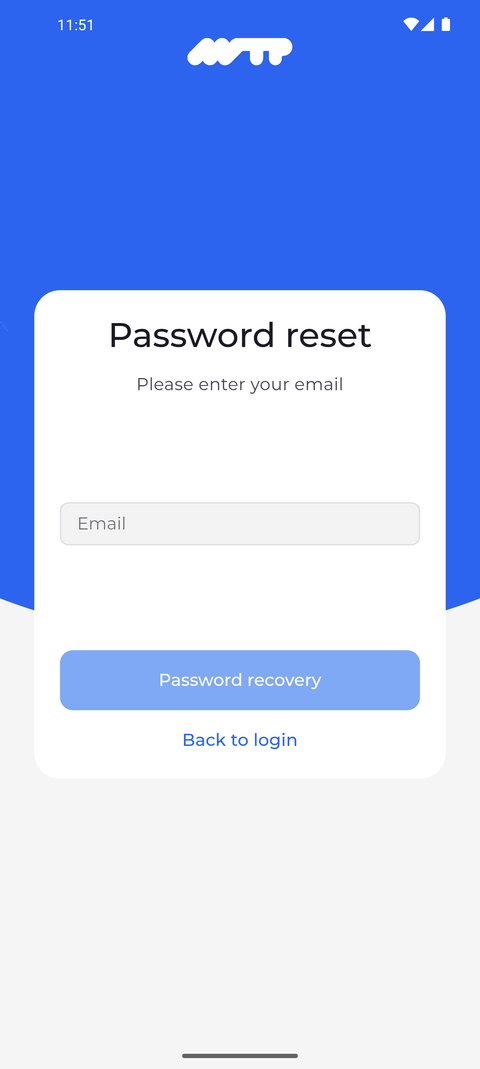
Step 1: Password reset asks for the email address of your account
Open the app, type your company ID and tap Next. On the Login form, tap Password reset at the bottom right. The Password reset form opens and asks for your email.
Tip: Password recovery stays greyed out until you type an address into Email.
-
Step 2: The app tells you whether a recovery email is on its way
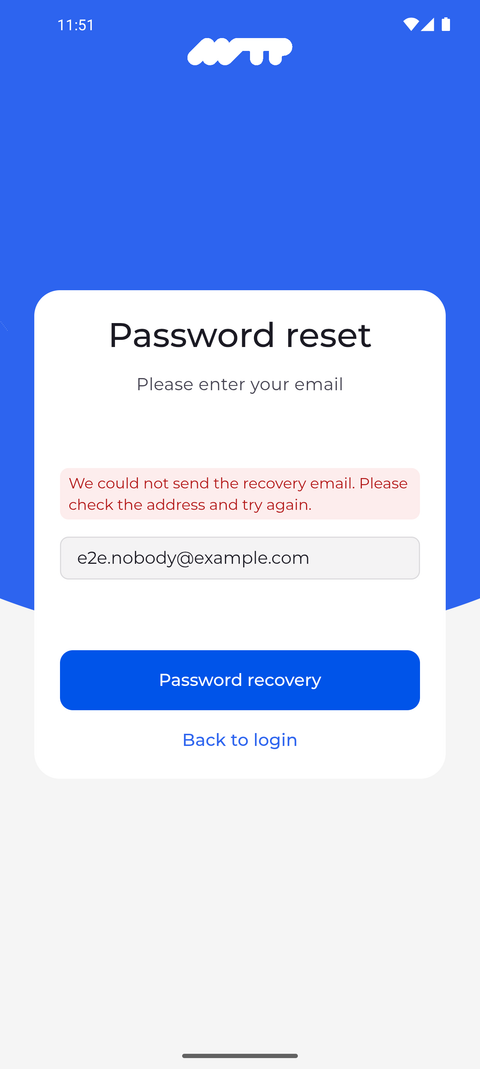
Type the email address of your account into Email and tap Password recovery. The app answers in a box above the field. Here it could not send a recovery email to the address typed, so it asks you to check the address and try again.
Tip: When the email has been sent, the app says "If an account is associated with this email address, you'll receive instructions via email". Follow the instructions in that email.
Tip: Without an internet connection the request cannot go out either, and the app shows the same "We could not send the recovery email. Please check the address and try again." message. Check your connection before you try again.
Tip: Back to login returns to the Login form without sending anything else.
What happens next
When the recovery email has been sent, the instructions to set a new password are in your mailbox.
Questions
Why does the app say "We could not send the recovery email. Please check the address and try again."?
No email could go out to that address: it may be mistyped, no account may use it, or your user profile has no password that could be reset, for example because your employment has ended. Check the address and try again. If your profile has no password, a reset cannot help - ask your manager to set a password in your user profile.