


Correct the attendance you are clocked in on
While you are clocked in, you can correct the attendance that is running: change its unit or start time, or add a note. You open it from the Attendance card on Home.
Before you start
You need:
- Clock in / clock out from the mobile app
- Changing this attendance - without it, the pencil next to the start time does not appear
- You are clocked in
New to the app? Start with Sign in to the MyTimePlan app.
When to use it
When you clocked in at the wrong unit or time, or want to add a note while you are still working.
Step by step
-
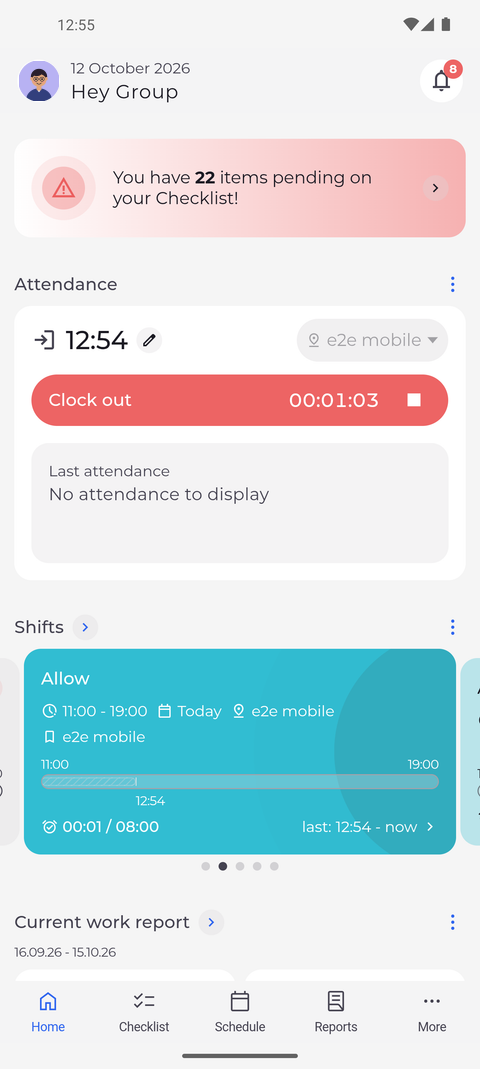
Step 1: While you are clocked in, the pencil next to the start time opens the attendance
On Home, the Attendance card shows the red Clock out button and a running counter while you are clocked in. Tap the pencil next to the start time at the top of the card.
-
Step 2: Change the unit, the start time or the note, then tap Send
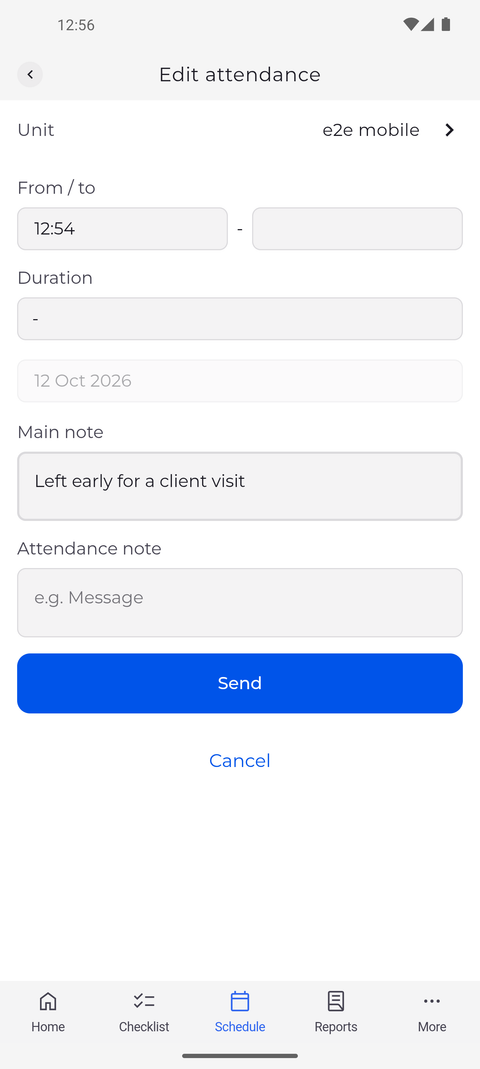
Edit attendance opens with the unit, the start time in From / to, Duration, the day of the attendance and the note fields, starting with Main note. Change what is wrong - the unit, the start time or a note - and tap Send.
Tip: The day of the attendance cannot be changed here - the date is shown greyed out. You can change the unit, the times and the notes.
Tip: Leave the end time empty to stay clocked in. If you fill it in, the attendance ends at that time and the card shows Clock in again.
Tip: Besides Main note, your company can add note fields of its own, such as "Attendance note", each with its own label. A note field that is greyed out is one you may read but not change.
What happens next
The running attendance has the corrected unit, start time or note, and you stay clocked in.
Good to know
- After Send the app confirms with "Attendance edited". The start time is then labelled Manual in the details of the attendance; the end you record later with Clock out is labelled Mobile.
Questions
Why is there no pencil next to the start time?
Your company does not let you change this attendance, so the pencil is hidden and holding Clock out does not open the editor either. Ask your manager to correct it. Right after you clock in, the pencil can take a moment to appear.
Why does the app say "Attendance start time cannot be in the future"?
The start time you set is later than now. Choose a time that has already passed and tap Send again.