


Open your current work report
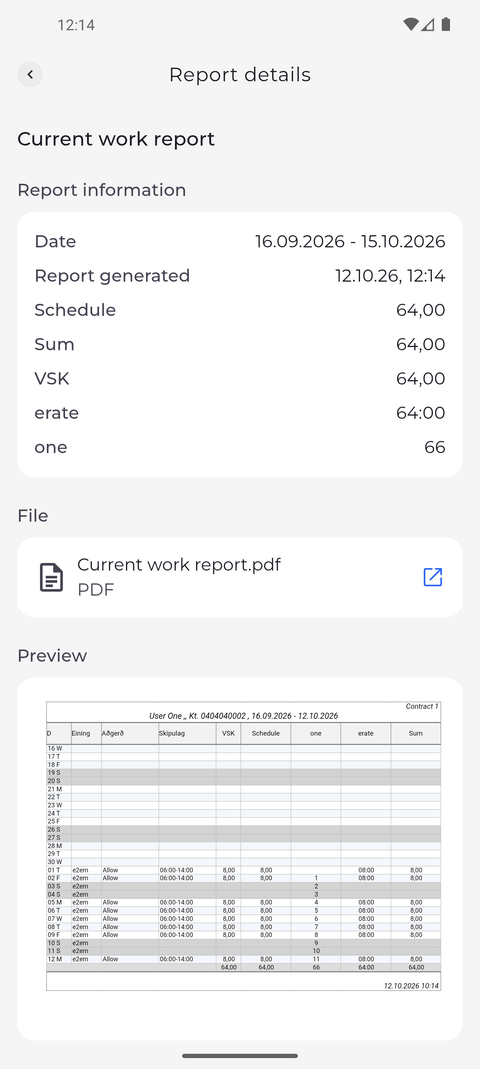
Your current work report shows the totals of the reporting period you are in, together with a preview of the report document, so you can check your hours before the period ends.
Before you start
You need:
- Access to your current work report - without it, Reports shows no current report card on top
New to the app? Start with Sign in to the MyTimePlan app.
Step by step
-
Step 1: Report information shows the period and your hours for it
On the Reports tab, tap the Current work report card at the top. Report details opens, and under Report information the Date row shows the period the report covers, followed by the report's totals for that period.
Tip: Report generated shows when these figures were calculated. Pull the page down to refresh them.
-
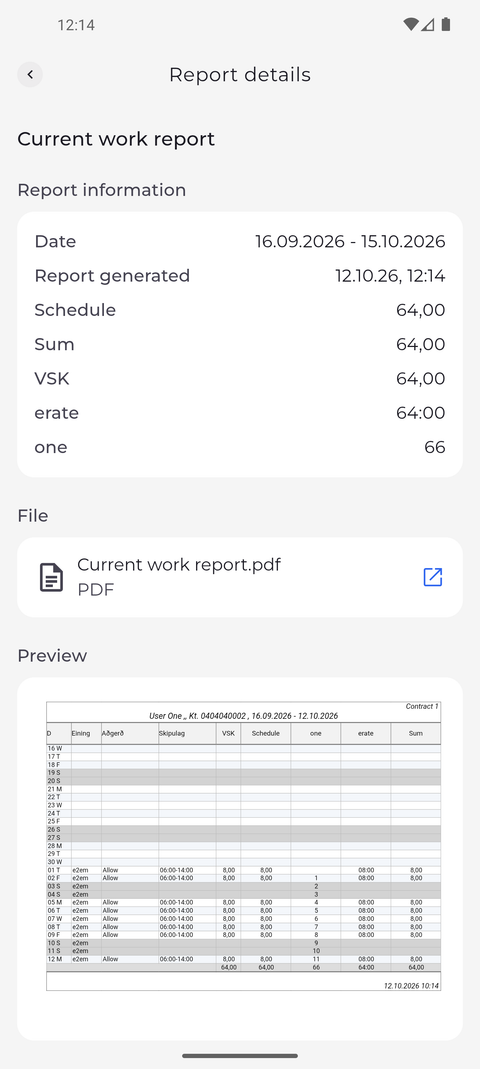
Step 2: Further down you see a preview of the report itself
Below the totals, File holds the report as a PDF and Preview shows the report document itself. If the preview cannot be loaded, the page says "Couldn't load the report preview." instead - tap Try again.
Tip: Pinch with two fingers to zoom into the preview, or double-tap a spot to zoom in there and double-tap again to zoom back out. While zoomed in, drag with one finger to move around the report.
Tip: If there is no Preview section at all, your account is not allowed to view the report document. You can still open the PDF under File; ask your manager if you need the preview.
What happens next
You have checked your hours for the period you are in, before it ends. Tap the back arrow at the top left to return to Reports.
Good to know
- Under File, tap the open icon next to the PDF to open the report in your phone's PDF viewer, where you can save or share it. If the download fails, the app says "Report download failed".
- The current report has no Confirmation section. A report is confirmed after its period has ended - open the finished report under Previous to see its confirmation.
Questions
Why does Report details say "Couldn't load the report."?
The app could not fetch the report, usually because of the connection. Pull the page down to try again. If it says "You don't have access to this report." instead, your account is not allowed to see it - ask your manager.