


Open your current report from Home
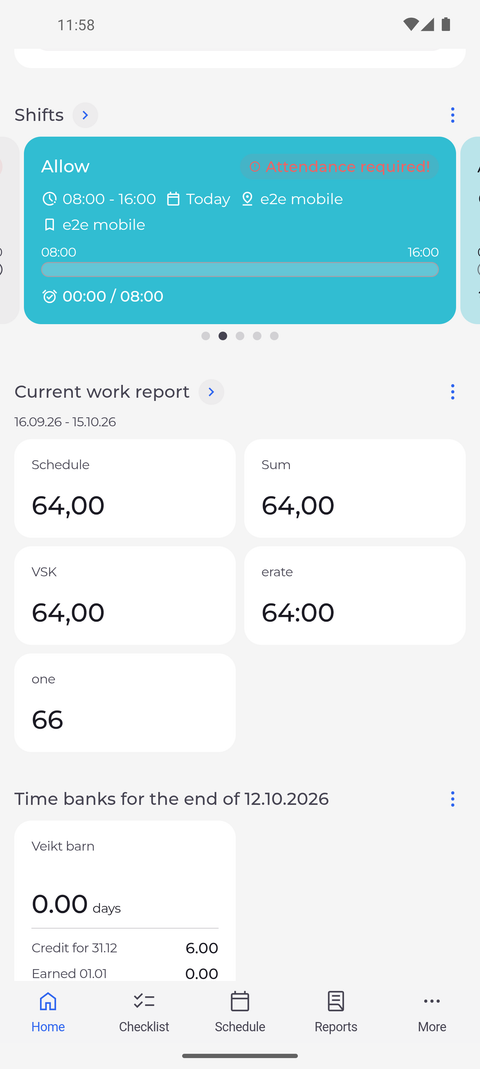
The Current work report widget on Home shows the figures of the reporting period you are in. Its arrow opens the full report.
Before you start
You need:
- Access to your current work report - without it, Home shows no Current work report widget
New to the app? Start with Sign in to the MyTimePlan app.
Step by step
-
Step 1: The Current work report widget shows your figures for this period
On Home, scroll to Current work report. Under the title you see the dates of the period, and below them one tile per figure, each with its name and value.
Tip: The dates under the title are the period the figures cover - the reporting period you are in now.
Tip: The figures are the columns of your work report, so their names and their number depend on how your company has set up the report.
Tip: To choose which figures the widget shows, tap the three dots next to the title, choose Manage widget, tick the figures you want and tap Save. Save stays greyed out until at least one figure is ticked.
-
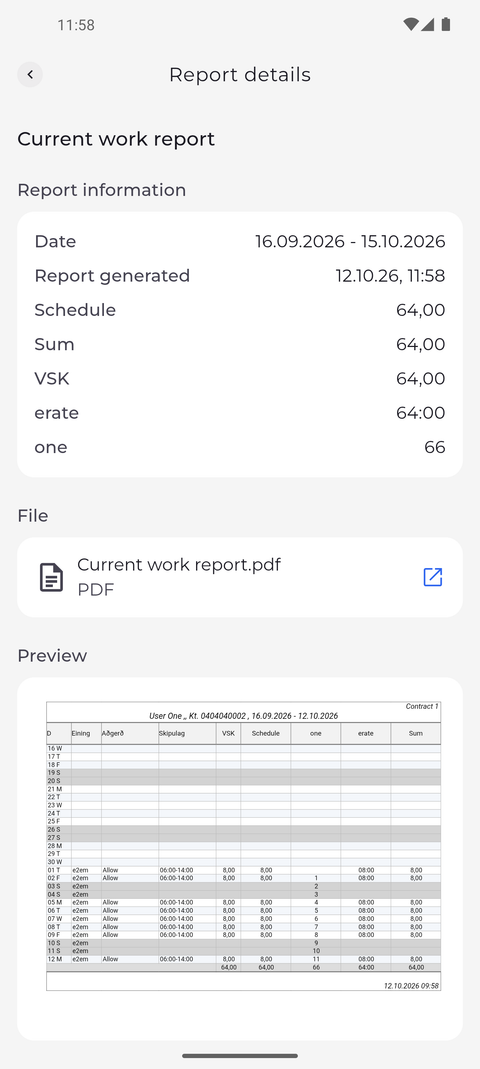
Step 2: The arrow opens the report with all its details
Tap the arrow next to Current work report. Report details opens: Report information lists the Date of the period, when the report was generated and each figure, File holds the report as a PDF, and Preview shows the report itself.
Tip: This is the same page you get to from the current report in Reports.
What happens next
You can check the figures of the current period from Home and open the full report when you need the details.
Good to know
- If the widget says "All fields hidden", every figure is switched off in Manage widget. Open it again and tick at least one.
- If the widget says "Nothing to display", there are no figures for the current period yet. Pull Home down to load them again.
- If Home has no Current work report widget and Home screen in Settings does not offer Current report either, your account may not read your current report - ask your manager.