


Add something to your schedule
The add button on the Schedule tab lists what you may add to your own schedule: a registration request, and a shift or an attendance if you are allowed to.
Step by step
-
Step 1: The round button at the bottom right adds to your schedule
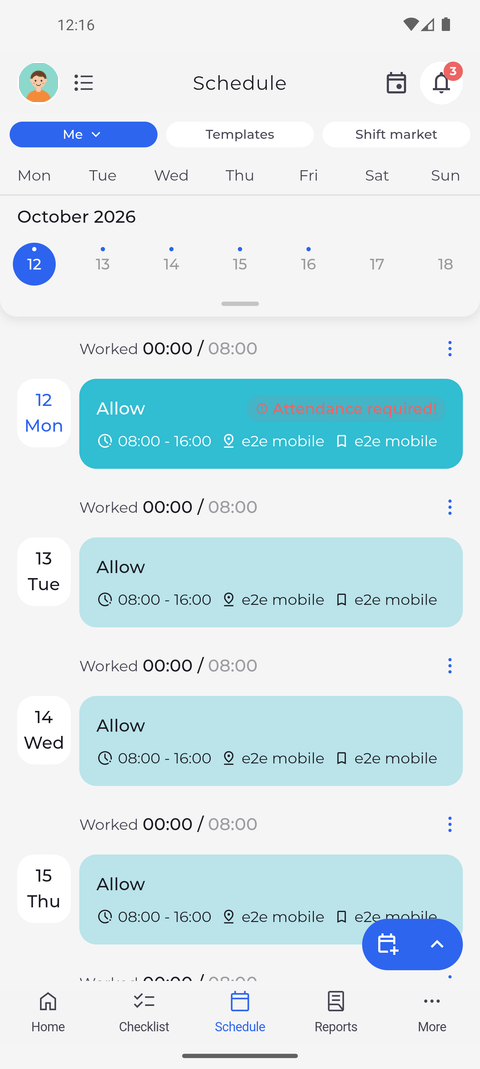
Tap Schedule in the bottom bar. On your own schedule (Me), a blue button with a calendar icon and an upward arrow sits at the bottom right. Tap the arrow.
Tip: The smaller button next to it is a shortcut: it opens Add shift if you may plan your own shifts, otherwise Add registration request.
-
Step 2: The menu lists what you may add - a registration request always
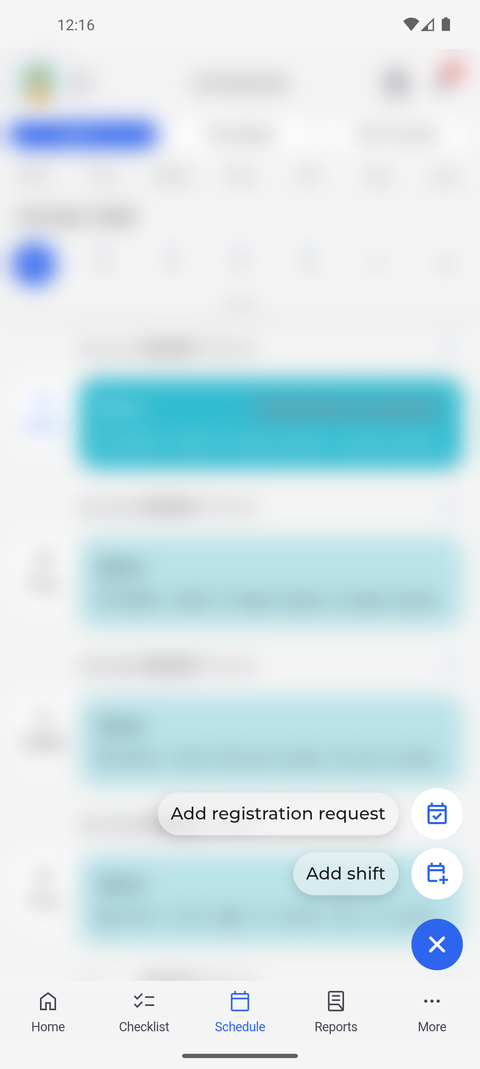
A menu opens above the button and the arrow turns into a cross. It lists what you may add - here Add registration request and Add shift. Tap an option to open its form.
Tip: Add registration request is always offered. Add shift and Add attendance only appear if your account may add shifts or attendances.
Tip: Add shift appears when you may plan your own shifts in at least one planning stage. Whether a particular day can take a shift depends on the stage that day is in, so the form may not accept every day.
Tip: The form opens on the day selected in the calendar strip.
Tip: Tap the button again, or anywhere outside the menu, to close it.
What happens next
You open the right form for what you want to add.
Good to know
- On the Shift market tab the button only offers Create shift exchange order, and only if you may post orders.
- The My team view has no add button - you can only add to your own schedule.