


Edit an employee
Open an employee's record in the classic employee editor to change their data.
Before you start
You need:
- Access to My Team (the people icon in the side menu)
- The right to edit employees
New to the app? Start with Sign in to the web app.
When to use it
When you need to change an employee's personal data, employment or access.
Step by step
-
Step 1: Open the employee's ⋮ menu
Open My Team, find the employee and click the ⋮ button at the end of their row. A menu with Edit employee opens.

-
Step 2: Edit the employee in the new tab
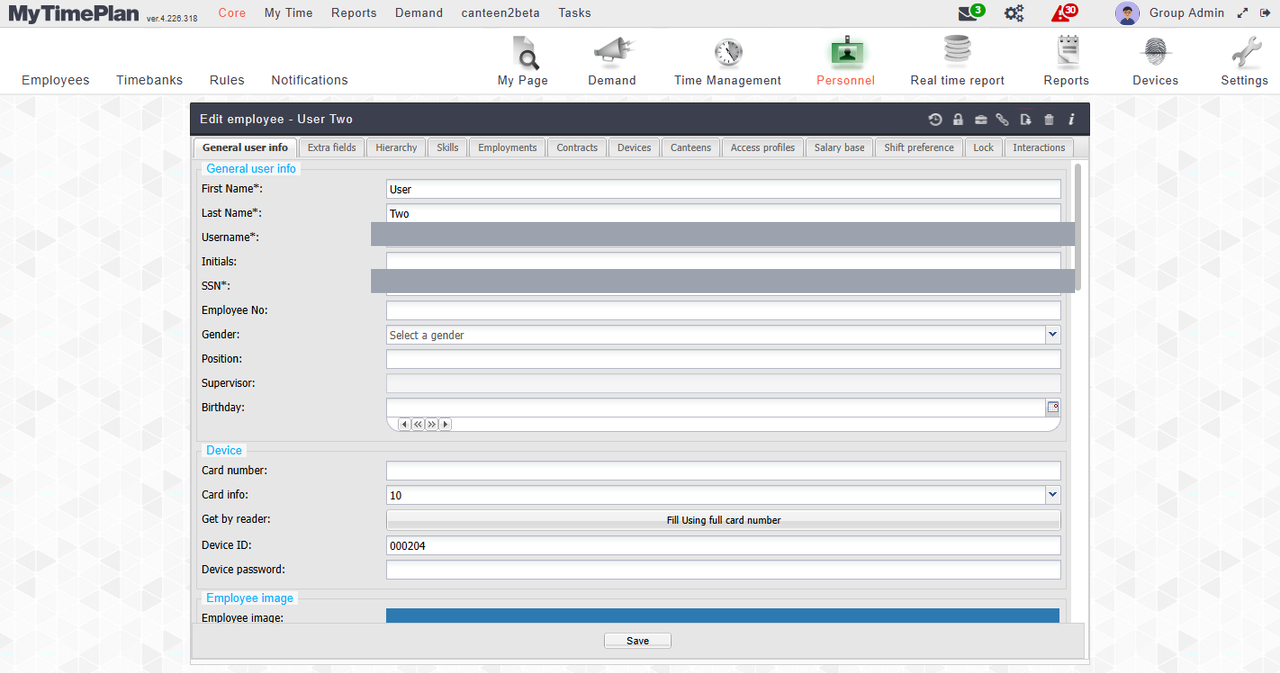
Click Edit employee. The employee's record opens in the classic editor in a new tab of your browser.
Tip: The editor's tabs (General user info, Employments, Contracts, Access profiles and more) hold the employee's data; save with Save at the bottom.
What happens next
You can change the employee's data in the classic editor. My Team stays open in the first tab.
Good to know
- My Team stays open in the first tab - switch back to it when you are done.