


Change your password
Change password lets you choose a new password that meets the password rules of your company.
Step by step
-
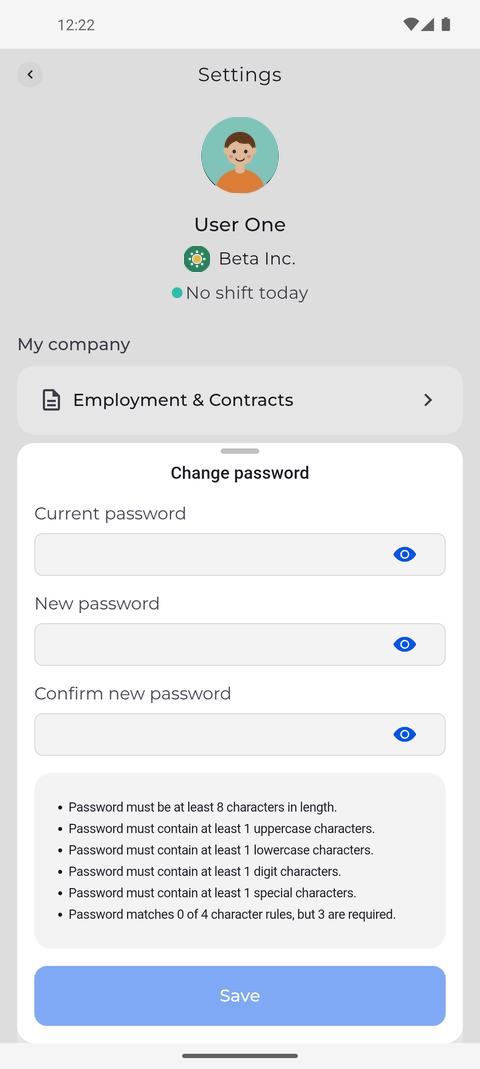
Step 1: Type your current password and the new one twice; the rules are listed below
Tap your profile picture at the top left of Home to open Settings, then tap Change password under Safety & access. A form slides up: type your current password in Current password, and the new one in both New password and Confirm new password.
Tip: The list under the form shows the password rules of your company. About a second after you stop typing a new password, it shows only the rules the password still breaks.
Tip: Tap the eye at the end of a field to show or hide what you typed.
-
Step 2: Save stays off until the new password meets every rule and both entries match
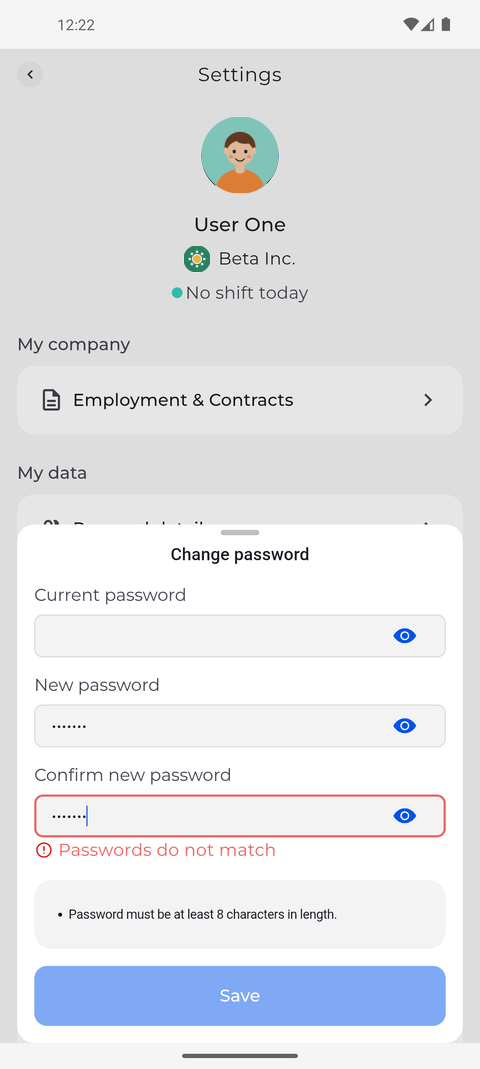
The form checks your entries as you type and flags what is still wrong. Here the two new entries differ, and the list under the fields still shows a rule the new password breaks.
Tip: Save stays off until all three fields are filled, the list of rules is gone and Confirm new password matches New password.
Tip: While the two new passwords differ, Confirm new password is outlined in red with "Passwords do not match" under it.
Tip: After you tap Save, the button shows a spinner until the answer comes back and cannot be tapped a second time meanwhile.
What happens next
Your password changes only when Save is on and you tap it; until then you keep signing in with your current password.
Good to know
- When the change goes through, the app shows "Password changed successfully", closes the form and keeps you signed in.
- If the change is refused, the app shows "Failed to change password" and the reason at the top of the form.
Questions
Why does Change password only say "Password change is not allowed"?
Your company does not let you change your password in the app. Ask your manager how to change it.